AI coding agents operate in a tight loop. You give an instruction. The agent reads files, writes code, runs commands, calls APIs. You review the output. Repeat.
The person at the keyboard is the agent’s only connection to the outside world. For single-person tasks — write a function, fix a bug, refactor a module — this works well. The loop is fast and the feedback is immediate.
But real work almost always involves other people. A client needs to provide business details. A stakeholder needs to approve a direction. A subject matter expert needs to verify assumptions. When the agent needs input from someone who is not in the terminal session, the human operator becomes a relay. They copy questions into an email, wait for a reply, paste the answers back into the conversation. The agent, for all its capability, is stuck waiting for one person to manually bridge two worlds.
This bottleneck limits what agents can do autonomously. Not because they lack skill, but because they lack reach.
The pattern: outbox and inbox
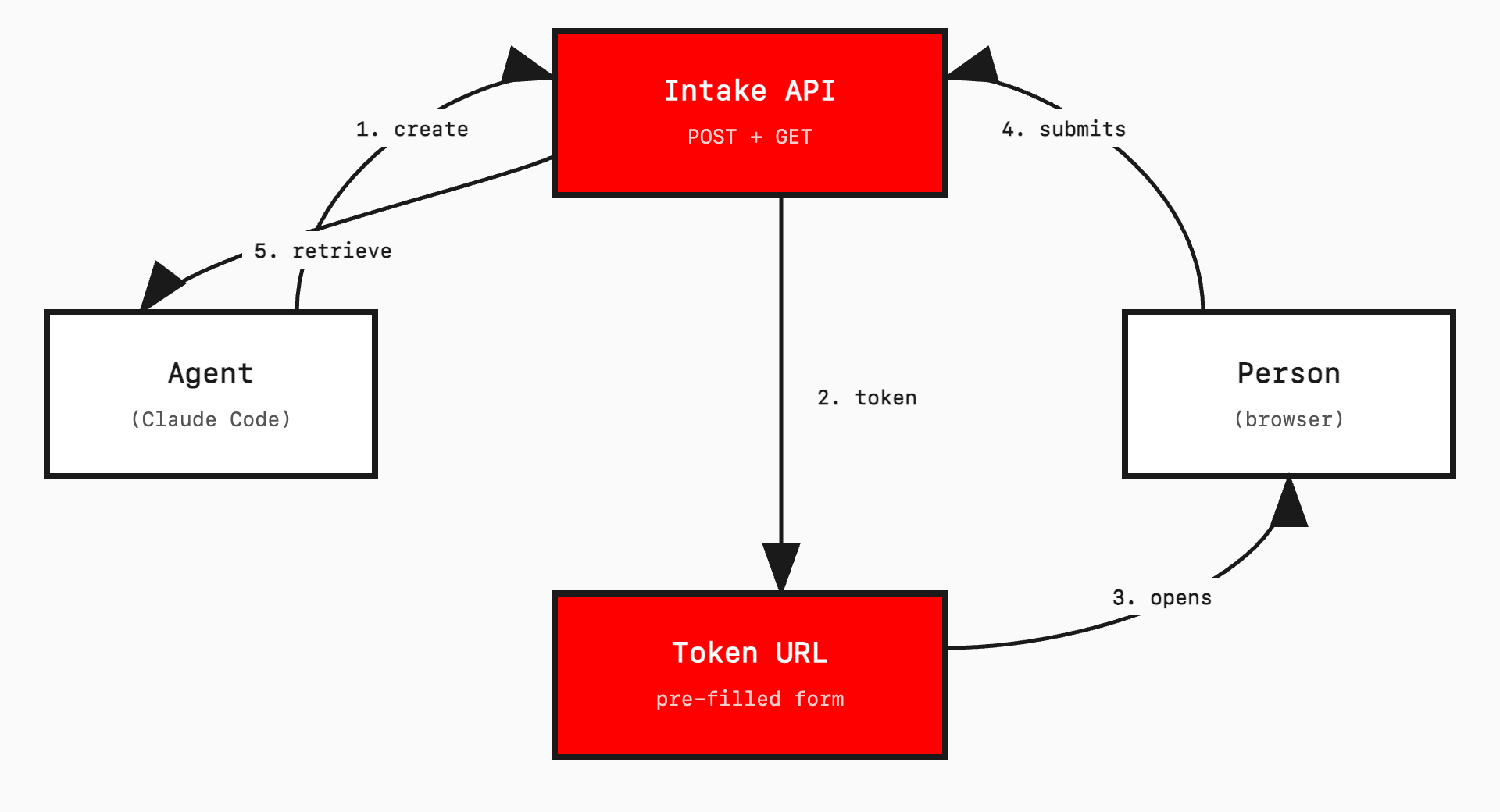
The fix is straightforward. Give the agent two new capabilities:
Outbox. The agent creates a structured question set, pre-fills it with what it already knows, and sends it to an external person via a token URL.
Inbox. The external person fills the gaps and submits. The agent retrieves the structured response via API and continues working.
The external person does not need an account. They do not need an app. They do not need to know an AI agent is involved. They see a form at a URL. They fill it out. That is it.
The token URL is the bridge. It serves as the session identifier, the access control, and the link between agent and human. One URL, one purpose, one submission.
My brother-in-law Joshua Easton, a product manager, called it a “feedback machine”. That is exactly right. The agent sends out structured questions, gets back structured answers, and keeps working. A machine for turning external human input into data the agent can act on.
A concrete example
I built this for client discovery in a website migration workflow. Here is what happens:
The agent runs a discovery skill. It scrapes the client’s website, searches business registries (ABN Lookup, ASIC), and gathers social profiles. It finds the business name, ABN, services offered, location, competitors, and contact details from public sources.
It structures this into JSON and creates an intake record via API. The API returns a token.
The agent then invokes a send-email skill. This opens Apple Mail with a pre-written message containing the token URL and an access password. The operator reviews and sends.
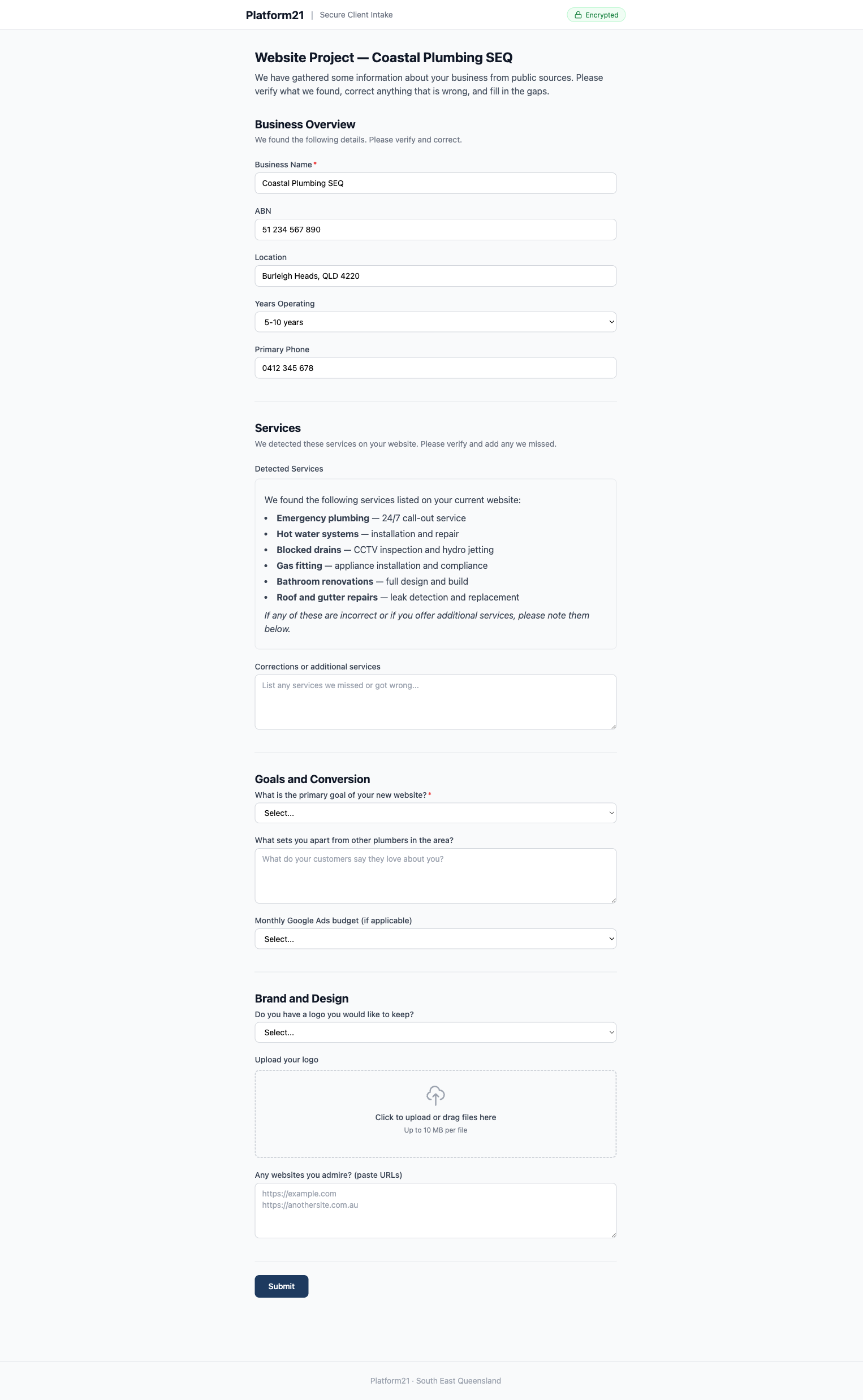
The client opens the link, enters the password, and sees a multi-step form. Their business name, services, location, ABN, and competitors are already filled in, marked “(auto-detected — please verify)”. Fields with blue borders indicate scraped data. Empty fields are clearly marked as needing input.
They verify what is correct, fix what is wrong, answer the subjective questions (goals, brand preferences, budget), upload their logo, and submit.
The agent retrieves the submission, merges it with the scraped data, and continues its work — producing a 930-line product requirements document, in this case.
The client spent five minutes verifying instead of thirty minutes filling from scratch. The agent got structured data it could act on immediately. No copy-pasting. No relay.
Why this matters for agents
Agents are getting better at multi-step autonomous work. They can hold context across dozens of files, plan sequences of operations, and recover from errors. But real-world tasks almost always cross organisational boundaries. A developer building a client’s website needs the client’s input. An agent preparing a report needs a reviewer’s sign-off.
Without an external communication channel, agents are limited to tasks a single person can complete alone. The operator is both the user and the bottleneck.
The outbox/inbox pattern breaks this constraint. It extends the agent’s reach without requiring the external person to join the agent’s session, install anything, or use specialised tools. The interface is a web form — the most universal interaction pattern on the internet.
It is also asynchronous by nature. The agent can create and send a form, move on to other work, and check back later. Or the human operator can monitor for submissions and trigger retrieval when one arrives. Either way, the agent is not blocked.
The pre-fill advantage
The form is not blank. The agent does its homework first.
Public data sources — websites, business registries, social profiles, review platforms, government APIs — often contain 60 to 80 per cent of the information needed. A scrape-mapper transforms this raw data into {value, source} pairs. The form UI renders scraped fields with a blue border and an “(auto-detected — please verify)” label. Empty fields are clearly marked as needing input.
This serves two purposes. First, it saves the respondent’s time. Verifying pre-filled data is faster than typing from scratch. Second, it demonstrates competence. Receiving a form that already knows your ABN, services, and competitors signals that the person (or process) asking has done their research. People are more willing to engage with a form that shows effort.
Pre-filling also reduces errors. When people type from memory, they make mistakes. When they verify existing data, they catch inaccuracies and provide corrections. The quality of the returned data is higher.
Implementation sketch
For developers who want to build something similar, the architecture is simple. The full source is available at github.com/mjsweet/intake-api.
API and form server. A single Cloudflare Worker (Hono framework) serves both JSON API endpoints and server-rendered HTML forms. One deployment, one domain.
Storage. NEON Postgres with Drizzle ORM for records. Two tables: intake_records (token, scraped_data JSONB, submitted_data JSONB, status, expiry) and intake_files (R2 references for uploads).
Form. Vanilla JavaScript, no framework. Multi-step navigation, localStorage persistence with API auto-save, drag-and-drop file upload. Around 300 lines.
Rich content fields. Not every field is an input. The form definition supports a content type — read-only rendered markdown. The agent composes a markdown string (headings, tables, lists, bold text, horizontal rules) and the server renders it as HTML inside the form. This is how an agent can present a proposal summary, a service breakdown table, or a scope of works directly inside the form, alongside the fields where the recipient provides their response. The markdown renderer is minimal — about 200 lines, no dependencies — but it handles the elements agents actually produce: headings, paragraphs, bold/italic, ordered and unordered lists, tables, code blocks, horizontal rules, and links.
Agent integration. Two API calls. POST /api/intake to create a record (returns a token). GET /api/intake/:token to retrieve the submission (returns JSON).
Multi-brand by hostname. The same Cloudflare Worker serves multiple brands. A brand configuration maps hostnames to names, colours, and footer text. The route handler reads the Host header and passes the matching brand to every view. Both intake.platform21.com.au and intake.ecomow.com.au resolve to the same worker — one sees navy branding, the other red. Adding a new brand means adding an object to the config and a DNS record. No new deployment, no code duplication.
This matters because the agent often works on behalf of different businesses. When it creates a form for an EcoMow client, the client should see EcoMow branding, not the agency that built the system. The hostname determines the brand; the agent just uses the correct domain when generating the token URL.
Security. Token URLs are cryptographically random (24 characters from a 55-character alphabet — roughly 138 bits of entropy). Expiry is enforced server-side (30 days default). Optional password protection adds a second layer: the agent sets a password when creating the record, and communicates it to the recipient via the email body. The form shows a password gate before revealing any data. You need the token URL and the password. The password is hashed with SHA-256 before storage. This is not suitable for high-security authentication, but it is appropriate for a form PIN where the threat model is accidental link sharing rather than targeted attack.
Keeping a local record
The remote API is ephemeral by design. Records expire after 30 days. The agent or operator can delete test forms at any time. This is fine for the API — it is a message bus, not an archive. But the project needs a permanent record of what was sent and what came back.
The solution is a local audit trail. After every API call, the agent appends a line to a JSONL file in the project directory:
{"ts":"2026-02-25T10:37:41Z","action":"create","method":"POST","path":"/api/intake","status":"draft"}
{"ts":"2026-02-25T10:38:02Z","action":"status_check","method":"GET","path":"/api/intake/:token","status":"sent"}
{"ts":"2026-02-26T14:22:11Z","action":"retrieve_response","method":"GET","path":"/api/intake/:token/response","status":"submitted"}
{"ts":"2026-02-26T14:22:15Z","action":"mark_imported","method":"PATCH","path":"/api/intake/:token/status","status":"imported"}
Alongside the log, the agent saves copies of the key artefacts: the form definition it sent, the response it received, and any files the respondent uploaded. These sit in the project’s output directory and persist indefinitely — they are just files on disk.
This means deletion on the remote API is safe. Once the agent has retrieved and saved the response locally, the remote record is redundant. The imported status signals that the data has been consumed. Deletion is for cleanup — removing test forms, duplicates, or honouring a data removal request — not a step in the standard workflow. The local audit trail is the permanent record.
The pattern is the same one that makes event sourcing work: the log of what happened is more valuable than the current state. If the project needs to be revisited months later, the audit trail shows exactly what was sent, when the client responded, and what they said. The remote API does not need to remember. The project does.
Beyond client intake
The pattern generalises. Any workflow where an agent needs structured input from an external human can use this approach:
Code review requests. The agent pre-fills a form with the diff summary, specific questions about implementation choices, and areas of concern. A reviewer provides structured feedback. The agent retrieves it and addresses each point.
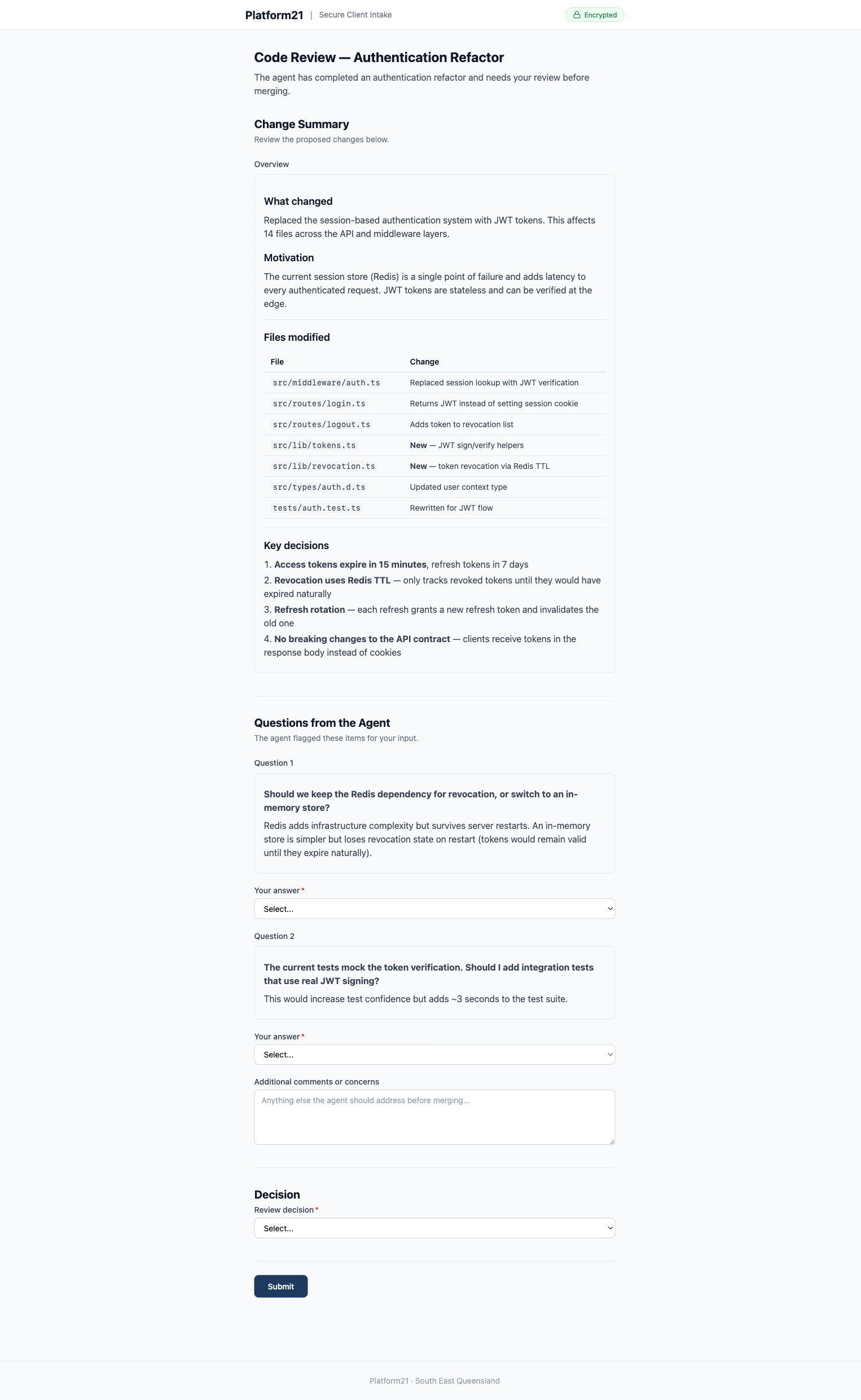
Approval workflows. The agent composes a proposal — a service breakdown table, scope of works, pricing, exclusions — and renders it as rich markdown inside a content field. Below the summary sits a decision dropdown and a comments box. The stakeholder reads the proposal, selects “Accept proposal” or “Request changes”, and submits. The agent gets a structured decision it can act on immediately, not a vague email reply buried in a thread.
Research validation. The agent pre-fills with findings from its analysis. A domain expert confirms, corrects, or adds nuance. The agent incorporates the expert knowledge and continues.
Multi-party projects. Different tokens for different stakeholders. Each person sees their relevant questions. Responses merge on the server. The agent sees the full picture without anyone seeing everyone else’s answers.
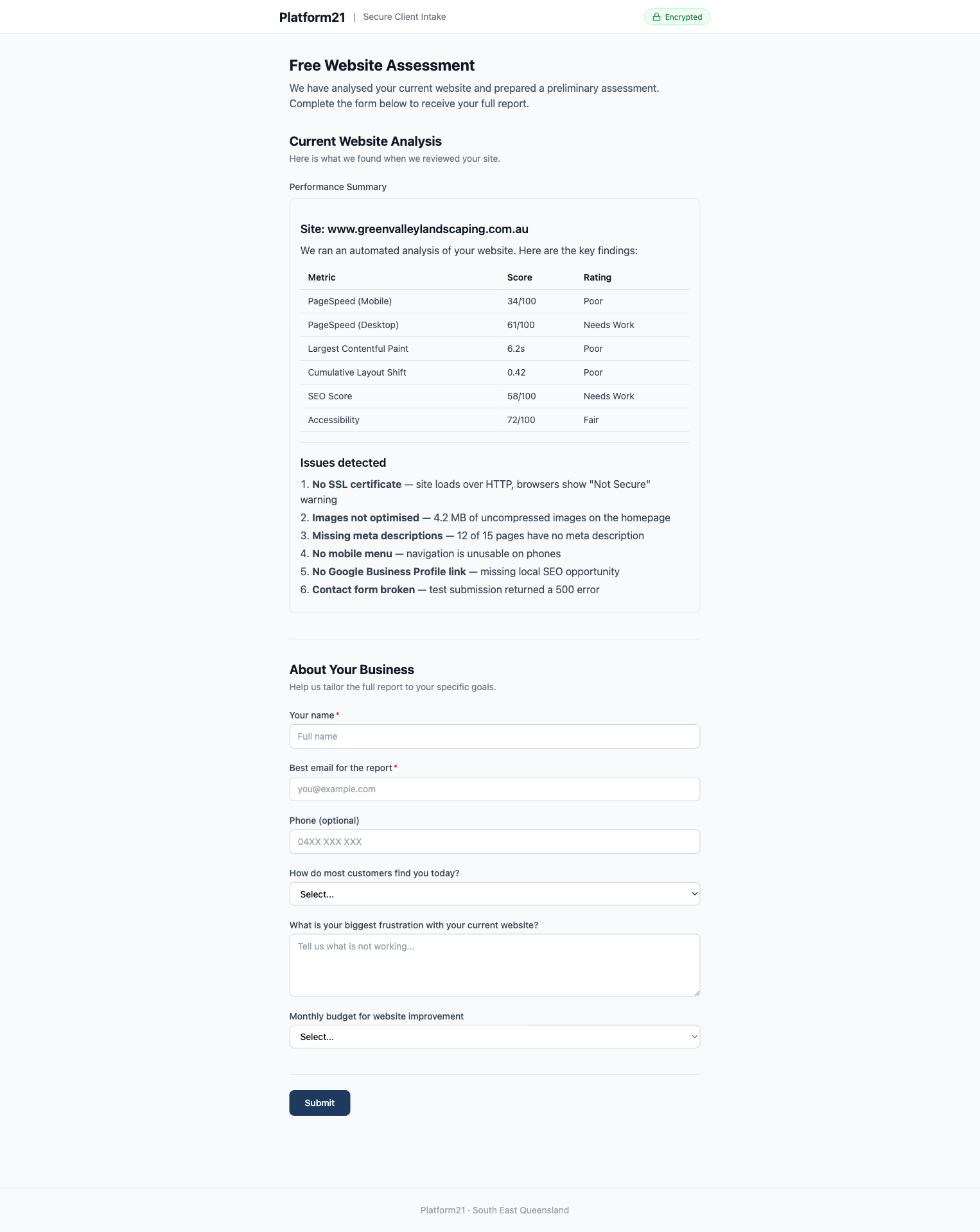
Lead qualification. A public-facing form where a prospect enters their URL. This triggers the agent’s scraping pipeline, which returns a pre-filled assessment the prospect completes. The agent qualifies the lead with structured data, not a free-text enquiry.
Limitations
Token URLs alone are security-by-obscurity. The password gate adds a second factor, but this still is not suitable for highly sensitive data. Medical records, financial credentials, or anything requiring proper authentication needs a real identity system, not a form PIN.
Scraping is fragile. Sites change structure, block bots, or serve different content to different user agents. The system needs graceful degradation — if scraping fails, the form still works. It is just empty. The respondent types instead of verifying.
Asynchronous means waiting. The agent (or operator) needs to know when a submission arrives. Polling works but is inelegant. Webhooks or push notifications would improve the experience. For now, the operator checks manually and triggers retrieval.
Pre-filled data can be wrong. If the respondent does not verify carefully, incorrect information propagates downstream. The UI tries to mitigate this with clear visual markers on scraped fields, but the responsibility ultimately sits with the person filling out the form.
The form is generic. A multi-step intake form works for structured business data. It would be less suitable for open-ended creative briefs, complex technical specifications, or anything requiring rich media input. Different use cases might need different form types.
How this differs from existing tools
Most human-in-the-loop patterns assume the human is the agent operator. The person who approves, corrects, or provides input is the same person who started the agent session — or at least someone on the same team with access to the same tools.
LangChain’s Agent Inbox is a developer dashboard for managing LangGraph interrupts. When an agent pauses, the operator reviews state and resumes the run. It is powerful, but the audience is the person running the agent.
HumanLayer routes approve/reject requests to Slack, email, or Discord. The humans in the loop are internal team members who receive notifications and make binary decisions. The agent asks “should I proceed?” and a colleague says yes or no.
The OpenAI Agents SDK prompts the operator to approve tool calls in the terminal. The human-in-the-loop is literally the person at the keyboard.
Cloudflare’s Agents SDK paired with Knock sends push notifications to team members for approval decisions. Again, the respondent is someone with access to internal notification channels.
All of these solve a real problem. Agents should not take consequential actions without oversight. But they all point inward — toward the operator or the team.
The outbox/inbox pattern points outward. The agent sends structured questions to someone who has no access to the agent’s session, no developer tools, and potentially no idea an agent is involved. A client. A stakeholder. A domain expert. They see a web form at a URL, not a Slack notification or a terminal prompt.
The second difference is pre-filling. The agent does research before asking questions, and populates the form with what it already knows. The respondent verifies and corrects rather than starting from blank. None of the tools above include this pattern.
The source code for the Intake API is available on GitHub.
What comes next
AI agents are getting better at doing work. The next challenge is getting better at working with people — asynchronously, across organisational boundaries, without requiring everyone to use the same tool.
Most agent frameworks focus on tool use: file systems, APIs, databases, web browsers. These are all machine interfaces. The missing piece is human interfaces — lightweight, asynchronous ways for agents to request and receive structured input from people who are not in the loop.
A token URL, a pre-filled form, and a JSON API is a simple bridge between an agent’s world and everyone else’s. It is not elegant. It is not novel technology. But it solves a real constraint that limits what agents can do today.
The agent’s world just got a little bigger.